Case Studies

Real Projects, Real Results

Anonymized examples from active client engagements.

Jump to a case study

DTC E-Commerce Amazon US Brand Analytics

DTC Kitchen Brand — Amazon Performance Hub

A single dashboard covering 12 months of P&L, PPC, and Brand Analytics SQP — from raw Amazon APIs to one place the team checks every morning.
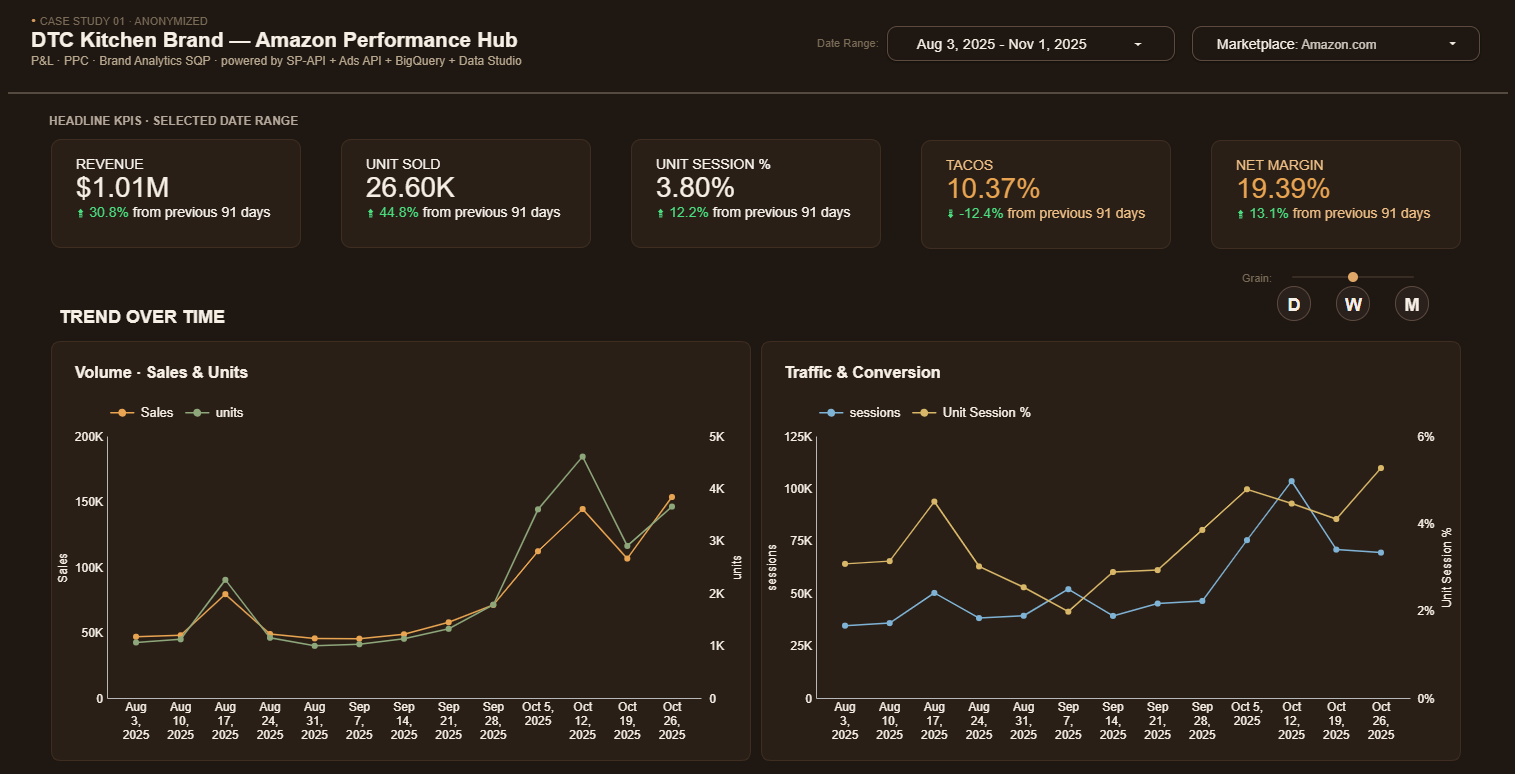
Dashboard hero — KPIs and trend charts

Click image to view the live dashboard →

The Challenge

The team was stitching together CSVs from Seller Central, Amazon Ads, and Brand Analytics every Monday morning — up to half a day of manual work just to answer "how did we do last week?" Margins were a black box because PPC, fees, and refunds lived in separate reports that nobody had time to reconcile against revenue.

What I Built

  • Automated SP-API + Ads API pipelines into a partitioned BigQuery warehouse — daily refreshes, no manual exports
  • Full P&L waterfall: revenue → COGS → FBA fees → PPC → refunds → net contribution, computed at SKU level
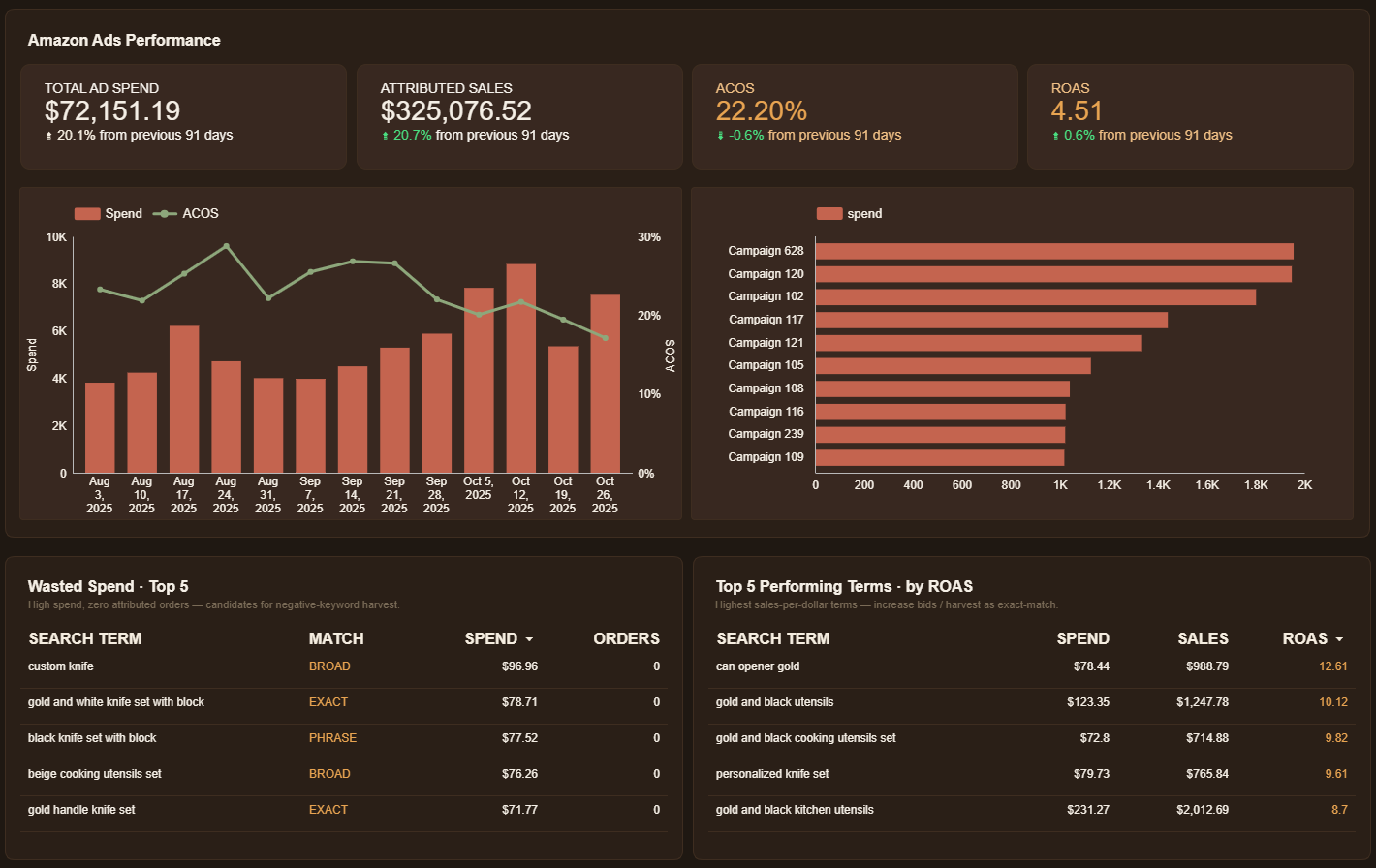
  • PPC performance layer: spend / ACOS / ROAS by campaign, plus wasted-spend detection (high-spend, zero-conversion search terms)
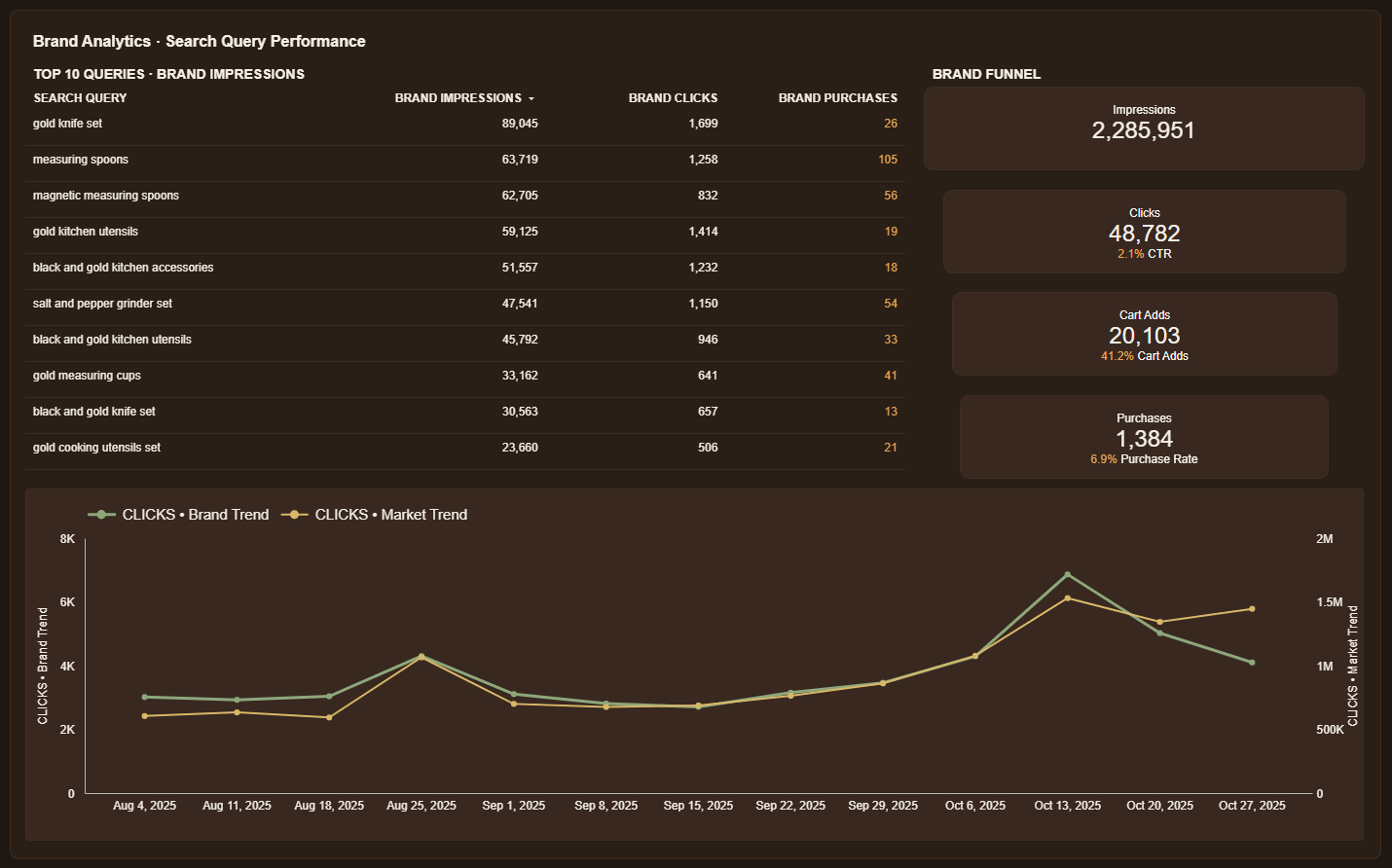
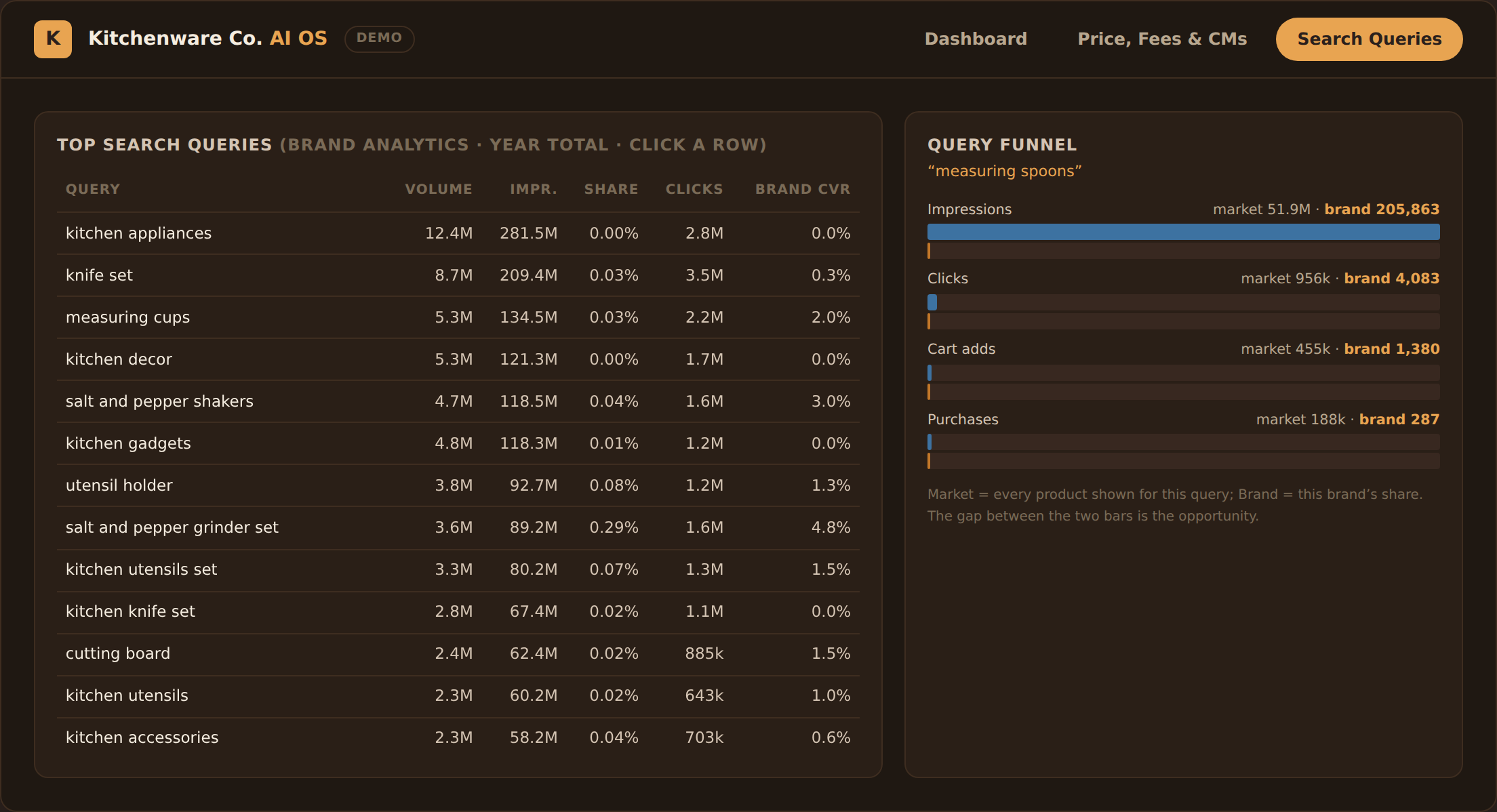
  • Brand Analytics SQP integration — brand-vs-market funnel showing impressions → clicks → cart adds → purchases at the search-query level
  • Data Studio dashboard with daily / weekly / monthly grain switch, filtered to a rolling 12-month window

The Impact

  • Monday-morning reporting collapsed from half a day → one click
  • Surfaced ~$500 / week of wasted ad spend on zero-conversion search terms — first negative-keyword harvest paid for the project
  • Made margin visible at the SKU level for the first time — product mix decisions now backed by net margin, not gut feel
BigQuery SP-API Amazon Ads API Brand Analytics Data Studio Python n8n

Inside the Dashboard
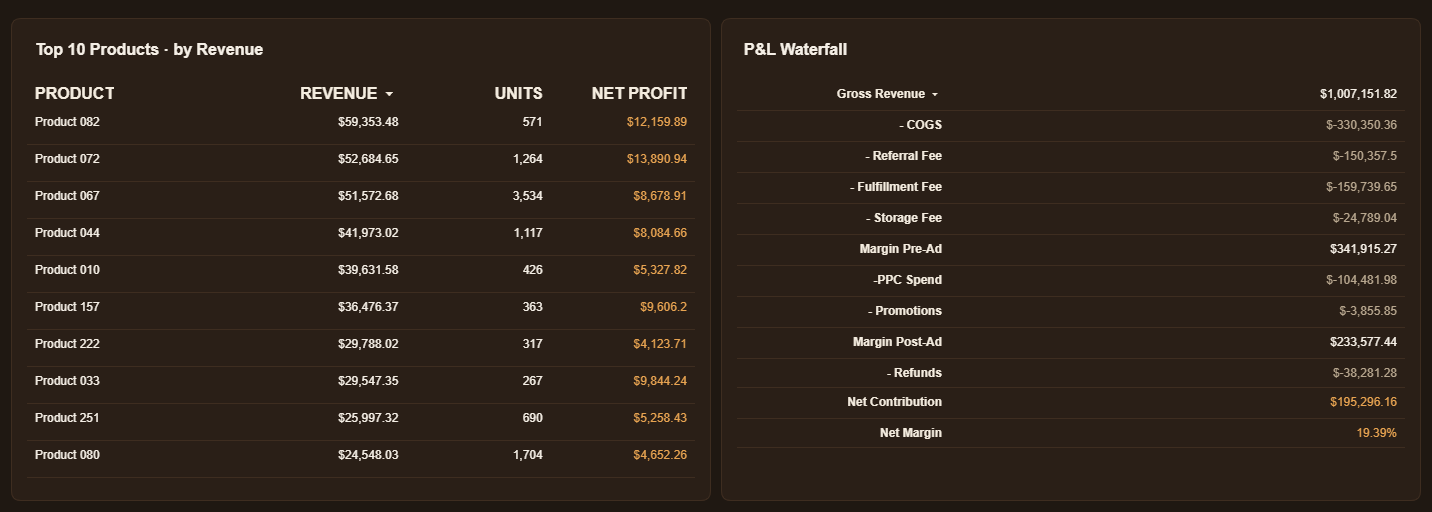
Top products and P&L waterfall
Top 10 SKUs ranked by revenue, with the full P&L waterfall on the right — revenue down to net contribution and margin %.
Amazon Ads performance and search-term insights
Amazon Ads performance, top campaigns by spend, plus the wasted-spend hit list and top-ROAS terms — the actionable side of PPC.
Brand Analytics SQP funnel
Brand Analytics SQP — top-10 search queries, brand-vs-market funnel, and click-share trend. Most freelancers can't access this data.

See it live

Anonymized data — product names, dates, and identifiers masked. Dollar amounts are real.
View Live Dashboard →
Travel Accessories Multi-Marketplace 12 Regions

Global Travel Brand — 12-Marketplace Performance Hub

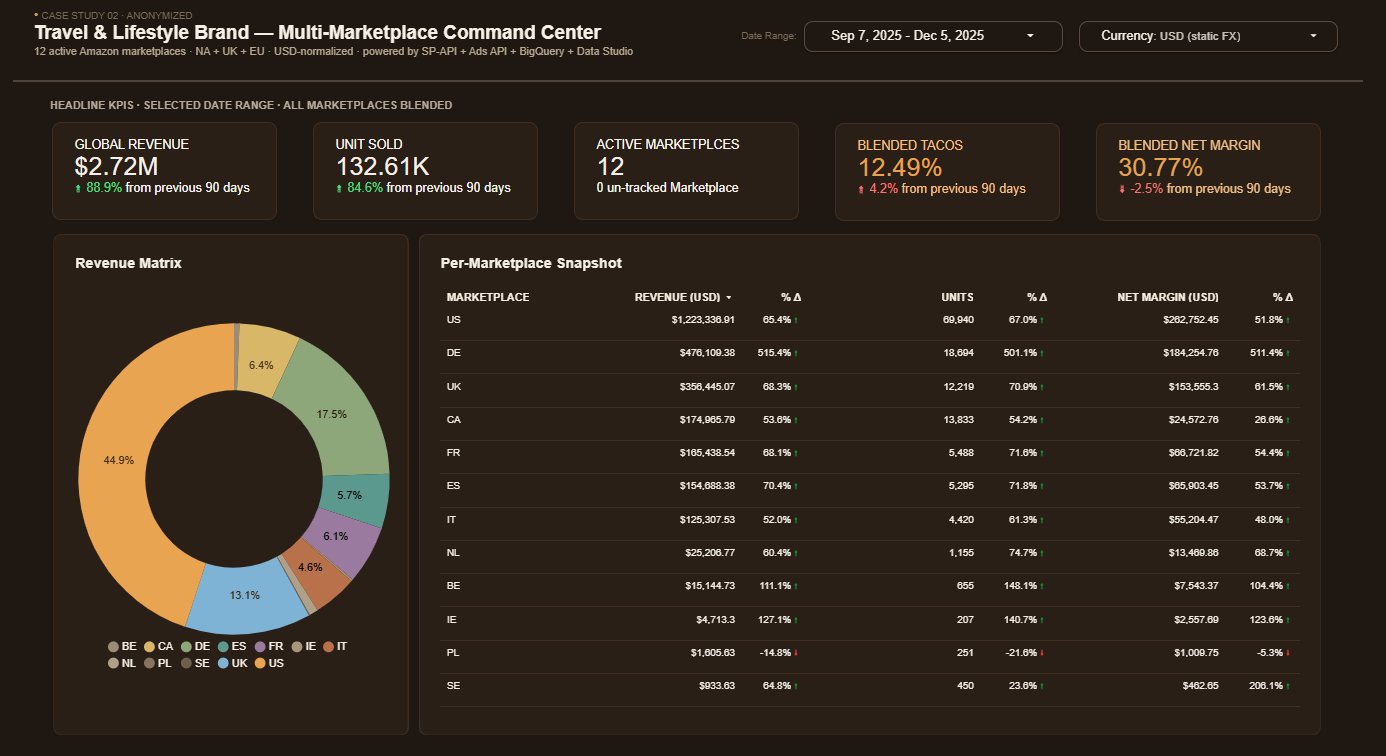
One dashboard covering 12 NA & EU marketplaces with USD- and VAT-normalized P&L, PPC, inventory coverage, and traffic — replacing a stack of per-region exports.

Dashboard hero — global KPIs and revenue mix across 12 marketplaces

Click image to view the live dashboard →

The Challenge

A travel-accessories brand selling across 12 Amazon marketplaces in North America and Europe couldn't see total performance in one place. Each region had its own Seller Central, its own currency, and its own VAT rules — so any "how is the brand doing this month?" question meant pulling 12 reports, converting currencies by hand, and reconciling VAT-inclusive vs VAT-exclusive revenue before anyone could compare regions fairly.

What I Built

  • Multi-region SP-API + Ads API pipelines feeding a single partitioned BigQuery warehouse — one row per SKU × marketplace × day, daily refresh
  • Currency normalization to USD at extract time via a static FX snapshot — analysts query USD, not 8 native currencies
  • VAT-exclusive revenue computed per row so EU/UK numbers compare apples-to-apples with US/CA (otherwise EU revenue is inflated ~17%)
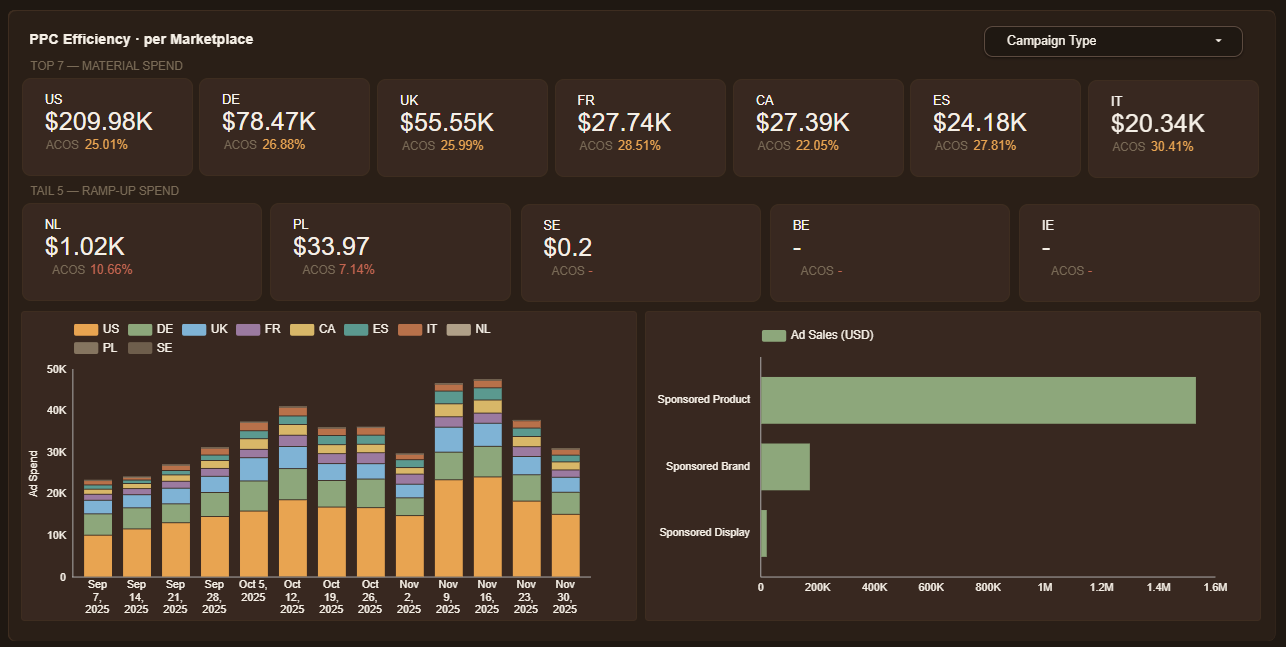
  • Unified PPC view across Sponsored Products / Brands / Display, with blended ACOS & TACOS per marketplace
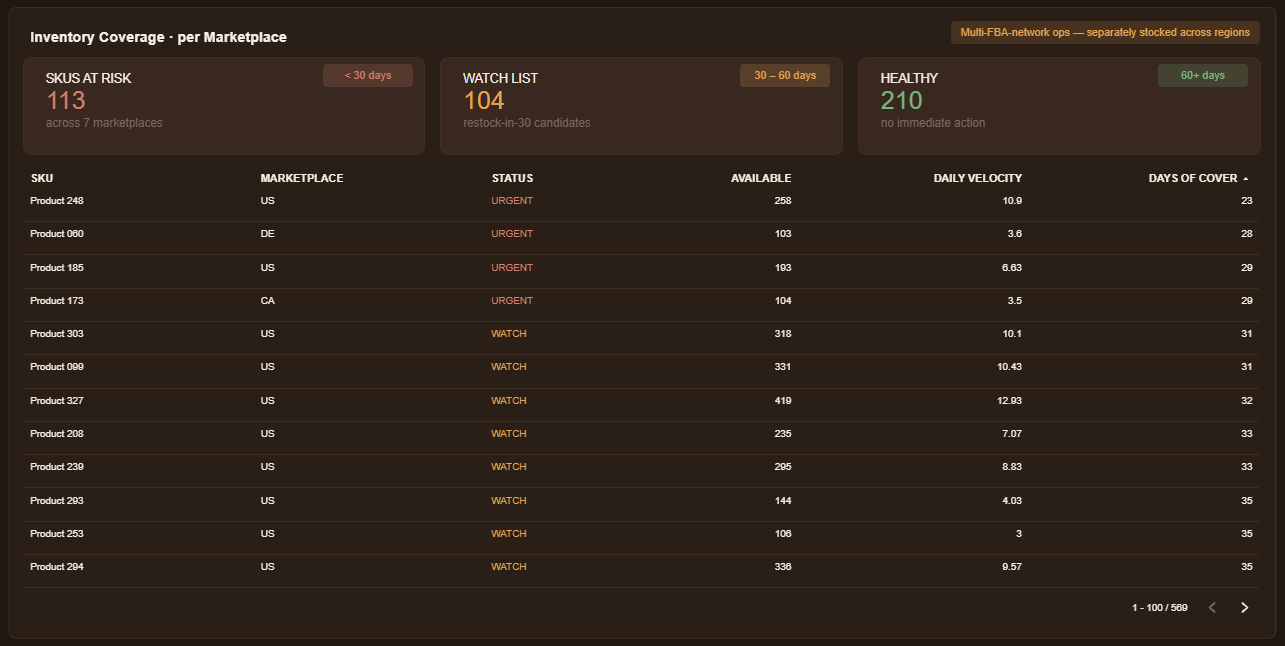
  • Inventory coverage layer classifying every SKU×MP as URGENT (<30 days), WATCH (30–60 days), or HEALTHY (60+ days) — restock decisions surface in one click
  • Data Studio dashboard with daily / weekly / monthly grain switch, rolling-365d window, and per-marketplace drill-downs

The Impact

  • 12 region-specific exports → one rolling dashboard — team checks it instead of building it
  • Cross-region revenue comparison is now VAT-clean — EU stops looking artificially larger than US/CA
  • Inventory restock cadence moved from quarterly review → URGENT-list at the top of every Monday standup
BigQuery SP-API Amazon Ads API Data Studio Python Currency & VAT normalization

Inside the Dashboard

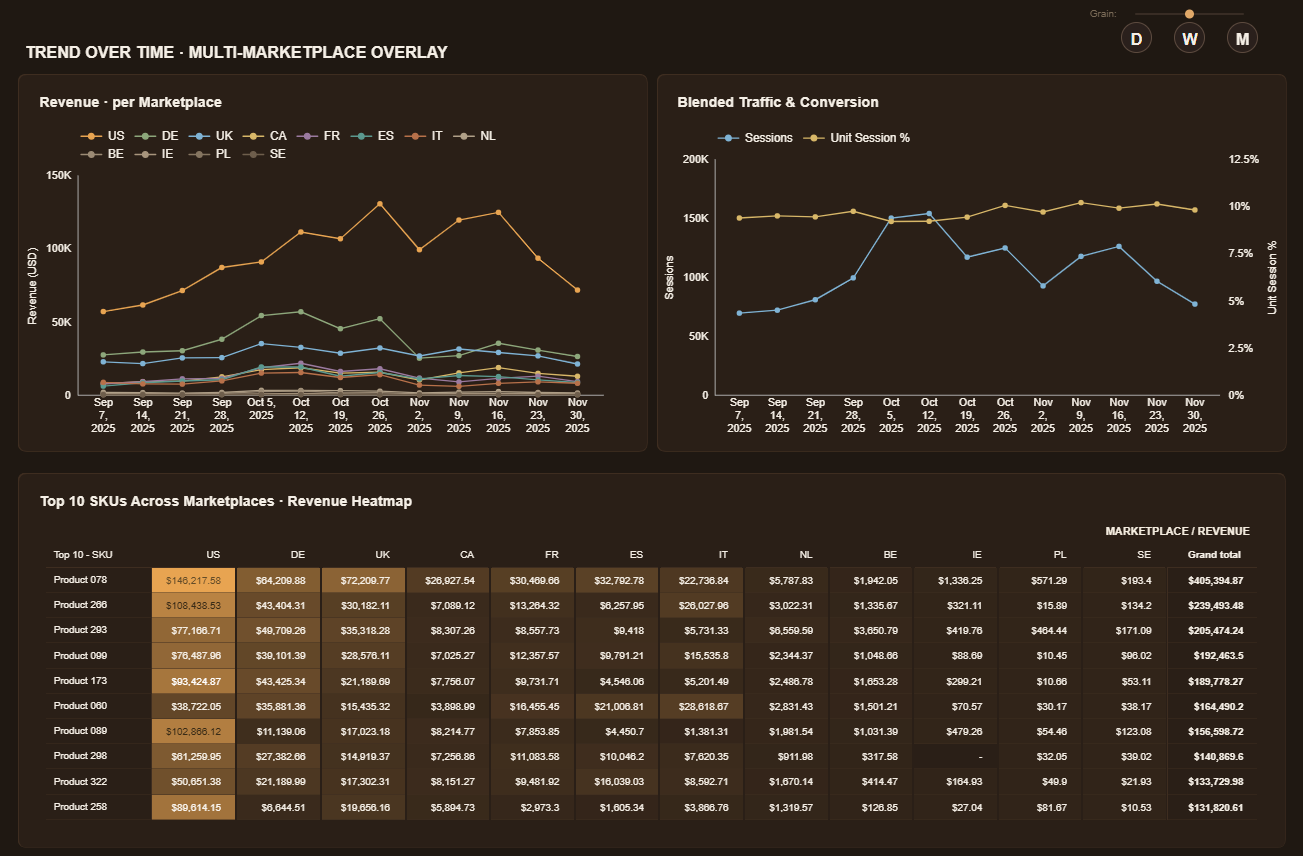
Revenue mix across 12 marketplaces and top-SKU heatmap
Revenue mix by marketplace plus the top-SKU heatmap — same SKU often has different regional winners, surfaced in one view.
PPC performance by campaign type across all marketplaces
PPC performance split by Sponsored Products / Brands / Display, with blended ACOS and TACOS rolled up per marketplace.
Inventory coverage with URGENT, WATCH, and HEALTHY status across marketplaces
Inventory coverage — URGENT / WATCH / HEALTHY classification with sortable per-SKU table, so restock conversations start with the riskiest items.

See it live

Anonymized data — product names, dates, and marketplace identifiers masked. Sales figures real; sessions illustrative.

View Live Dashboard →
CPG / Beverage Multi-Channel Online + Retail-Scan

Omnichannel Command Center for a Beverage Brand

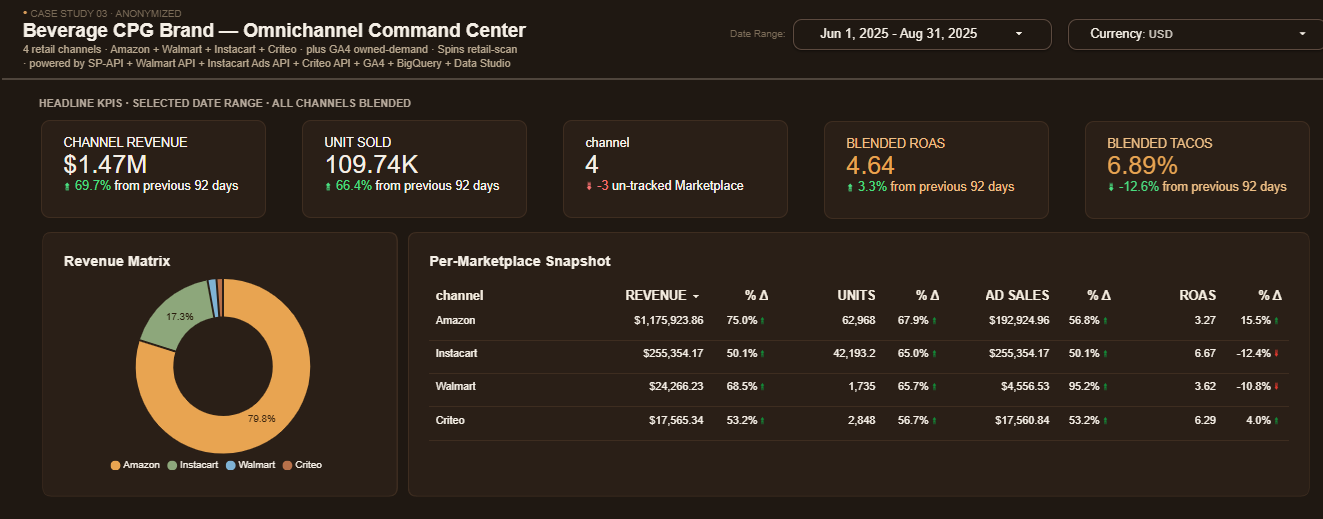
One dashboard unifying 4 retail channels (Amazon, Walmart, Instacart, Criteo) with GA4 owned-demand and SPINS retail-scan — blended ROAS & TACOS, a clicks→orders→sales funnel per channel, and brick-and-mortar velocity in a single view.

Dashboard hero — omnichannel KPIs across Amazon, Walmart, Instacart, Criteo and GA4

Click image to view the live dashboard →

The Challenge

A premium cold-brew brand sold across Amazon, Walmart, Instacart, and Criteo — each with its own ad platform, its own attribution rules, and its own export format — plus SPINS retail-scan data for its brick-and-mortar distribution. Answering "how is the brand doing across everything?" meant pulling reports from 5+ APIs, lining up mismatched click/order/sales definitions by hand, and there was no view that tied online demand to retail velocity. Most Amazon-only freelancers stop at Seller Central; this brand needed the full picture.

What I Built

  • Unified BigQuery warehouse pulling SP-API, Walmart API, Instacart Ads API, Criteo API, GA4, and SPINS retail-scan into one daily-refreshed model
  • Blended ROAS & TACOS across all 4 retail channels, with a per-marketplace revenue / units / ad-sales snapshot and period-over-period deltas
  • Normalized clicks → orders → attributed-sales funnel across channels, with each platform's quirks reconciled (e.g. Instacart units as an order proxy)
  • GA4 modeled as an owned-demand layer feeding an owned-to-retail funnel — sessions → clicks → retail orders → attributed revenue in one chain
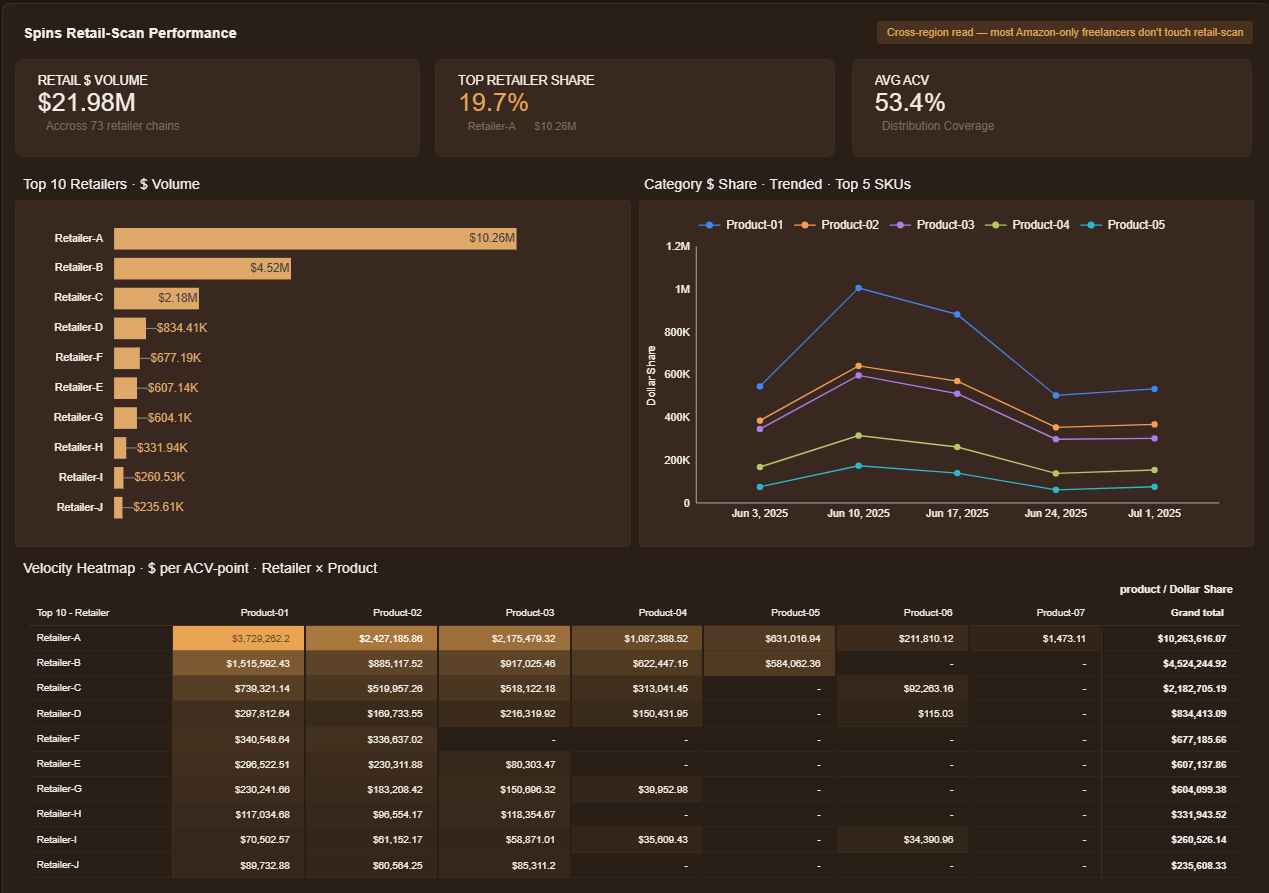
  • SPINS retail-scan layer — $ volume across 70+ retailer chains, category share by SKU, and a retailer×product velocity heatmap (the brick-and-mortar half most Amazon dashboards ignore)
  • Data Studio dashboard with daily / weekly / monthly grain switch and a single channel dimension for clean per-channel breakdowns

The Impact

  • 6 separate API exports → one omnichannel command center — total performance without manual consolidation
  • Online and brick-and-mortar finally sit side by side — retail-scan velocity next to e-commerce ROAS, not in a separate silo
  • Owned demand → retail conversion is one funnel — the brand sees GA4 sessions flow through to attributed revenue, and spotted GA4 checkout tracking as a quick-win gap
BigQuery Data Studio SP-API Walmart / Instacart / Criteo APIs GA4 SPINS retail-scan n8n Python

Inside the Dashboard

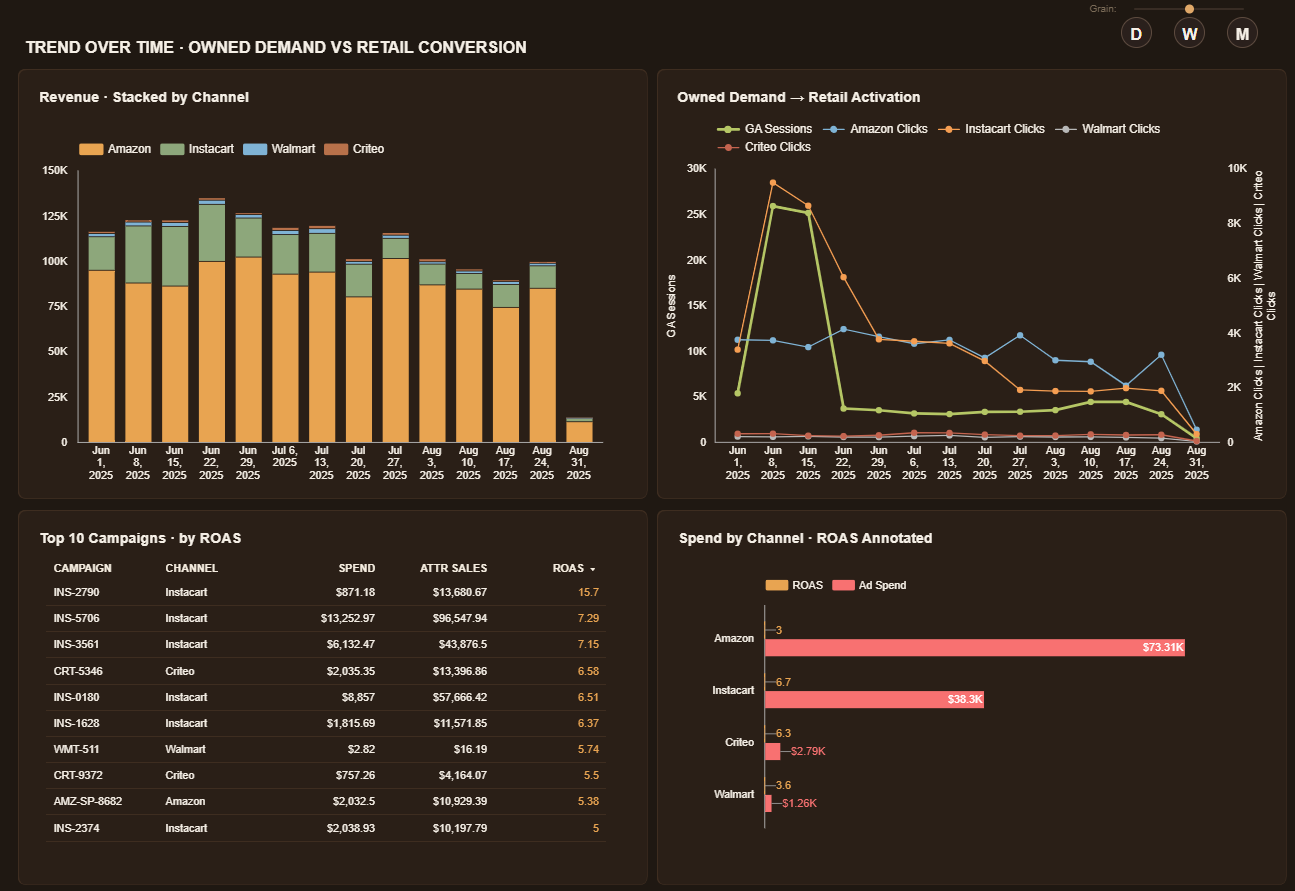
Revenue stacked by channel, owned-demand vs retail activation, and campaign ROAS over time
Trend over time — revenue stacked by channel next to an owned-demand-vs-retail-activation chart, top campaigns ranked by ROAS, and ad spend annotated with ROAS per channel.
SPINS retail-scan — top retailers by dollar volume, category share by SKU, and retailer-by-product velocity heatmap
SPINS retail-scan — dollar volume across 70+ retailer chains, category share trended by top SKUs, and a retailer×product velocity heatmap. The brick-and-mortar read most Amazon-only dashboards never touch.
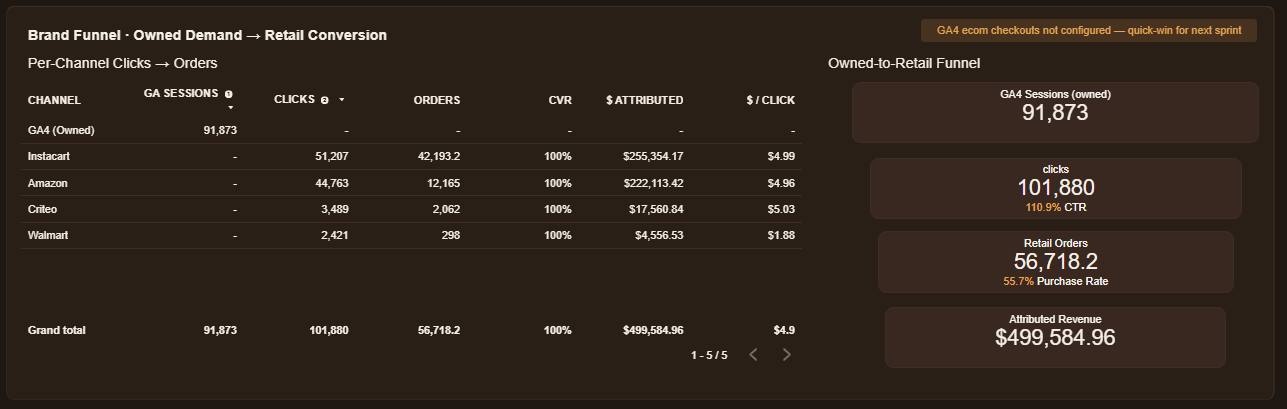
Per-channel clicks to orders table and the owned-to-retail funnel from GA4 sessions to attributed revenue
Per-channel clicks → orders with CVR and $/click, beside the owned-to-retail funnel: GA4 sessions → clicks → retail orders → attributed revenue in one chain.

See it live

Anonymized data — product names and platform identifiers masked. GA4 sessions illustrative.

View Live Dashboard →
AI Workspace Claude API Client-Owned

Home & Décor Brand — AI OS for E-Commerce

A private AI workspace the client owns outright: chat with the warehouse, dashboards reconciled to the cent, scheduled AI routines — the "own it, don't rent it" alternative to hosted AI analytics tools.

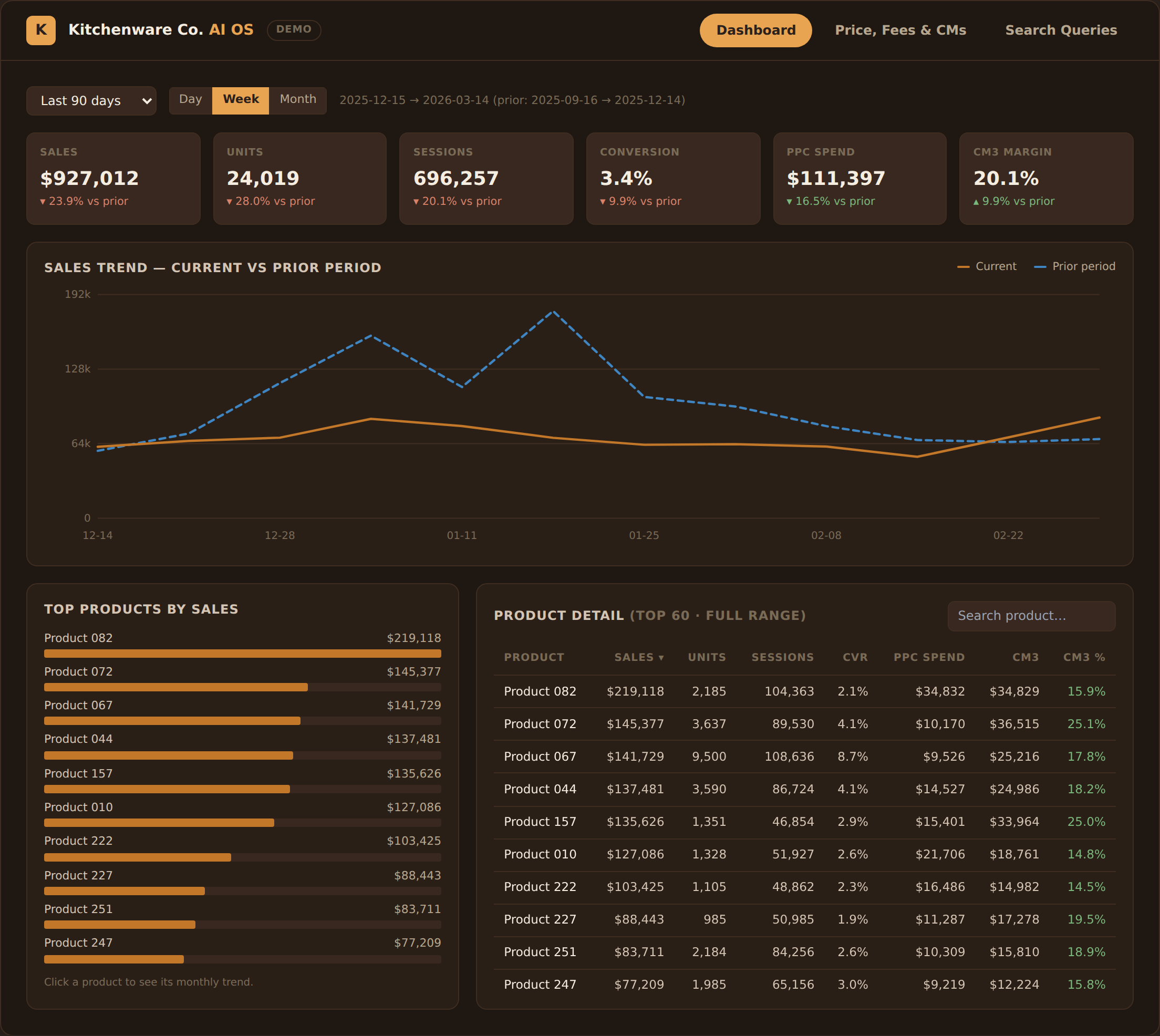
AI OS dashboard — KPIs, period comparison, product detail

Click image to open the interactive demo →

The Challenge

The team was paying for a hosted AI-analytics subscription that answered questions about their own data on someone else's platform — and every deeper question still queued behind an analyst. They wanted the AI capability in-house: their warehouse, their access rules, their tool — with numbers they could trust down to the cent.

What I Built

  • A private web workspace on the client's own BigQuery: AI chat, rebuilt dashboards, and role-gated access (team reads, owners administer)
  • AI analyst on the Claude API in a guarded tool-calling loop — every answer comes from a real SQL query against a ~156-column semantic layer, never from the model's guess
  • Hard guardrails: read-only service account, SELECT-only SQL, query-cost caps, row-render limits — safe enough for the whole team to use
  • Dashboards rebuilt from the legacy BI tool and reconciled to the cent — trend & period comparison, search-query gap analysis, and per-unit price/fees/margin views
  • Configurable agents with skills, tools, and memory; scheduled routines (an agent that emails its own report); and MCP publishing so the owner can query the workspace from their own AI apps

The Impact

  • Replaced a per-seat AI-analytics subscription with an asset the client owns outright — their warehouse, their keys, their rules
  • Data questions that used to queue behind an analyst are now self-serve for the whole team, with numbers that match the books because they come from the warehouse
  • Data refreshes every ~2 hours end-to-end — SP-API & Ads pipelines in, curated semantic layer, AI on top — zero manual steps
Claude API BigQuery Next.js Supabase SP-API MCP Python

Inside the Workspace (re-imagined interface on sample data — explore it yourself in the demo)

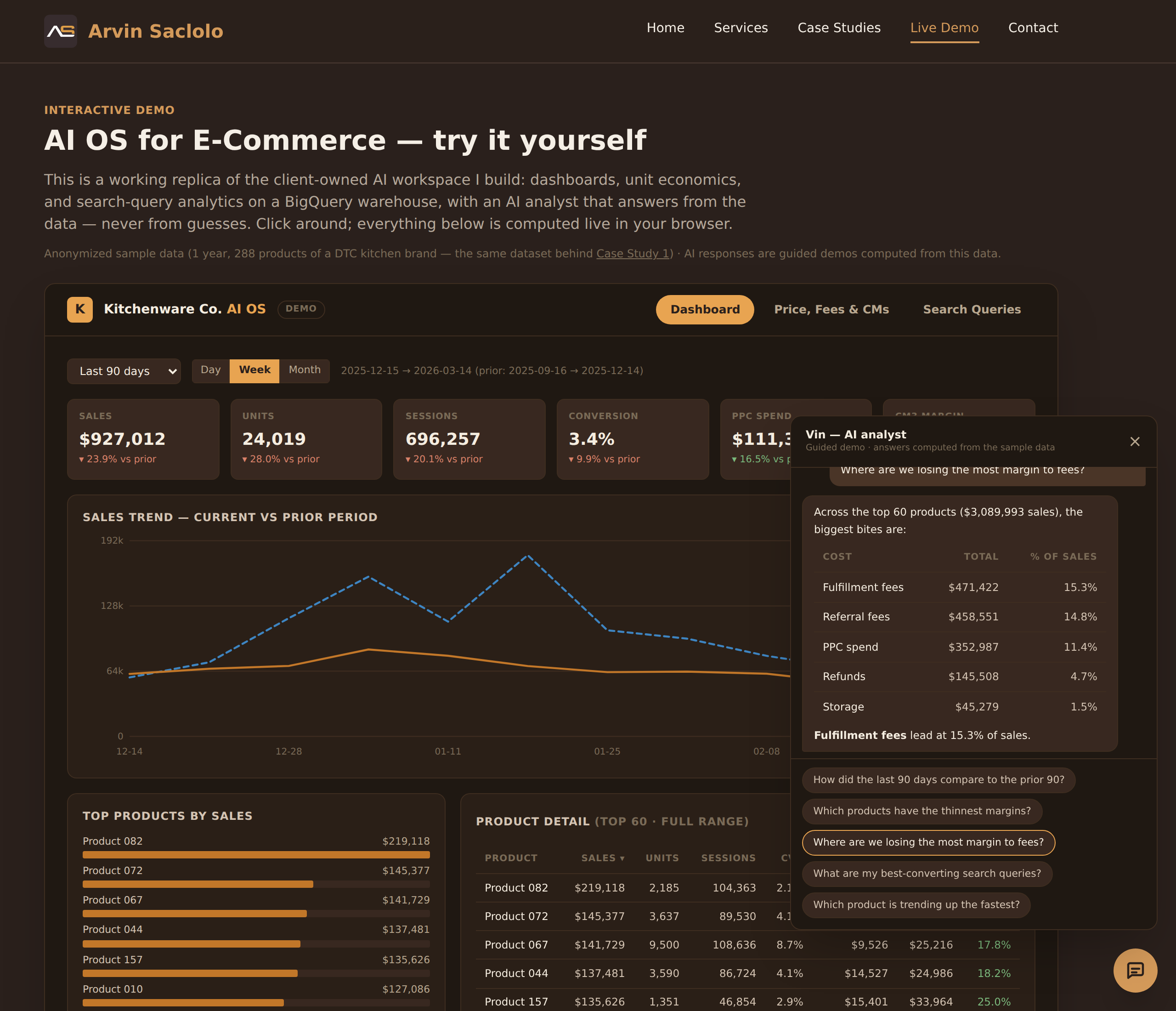
AI analyst answering a margin question with a computed table
The AI analyst answering "where are we losing margin to fees?" — a real breakdown computed from the data, rendered as a table in chat.
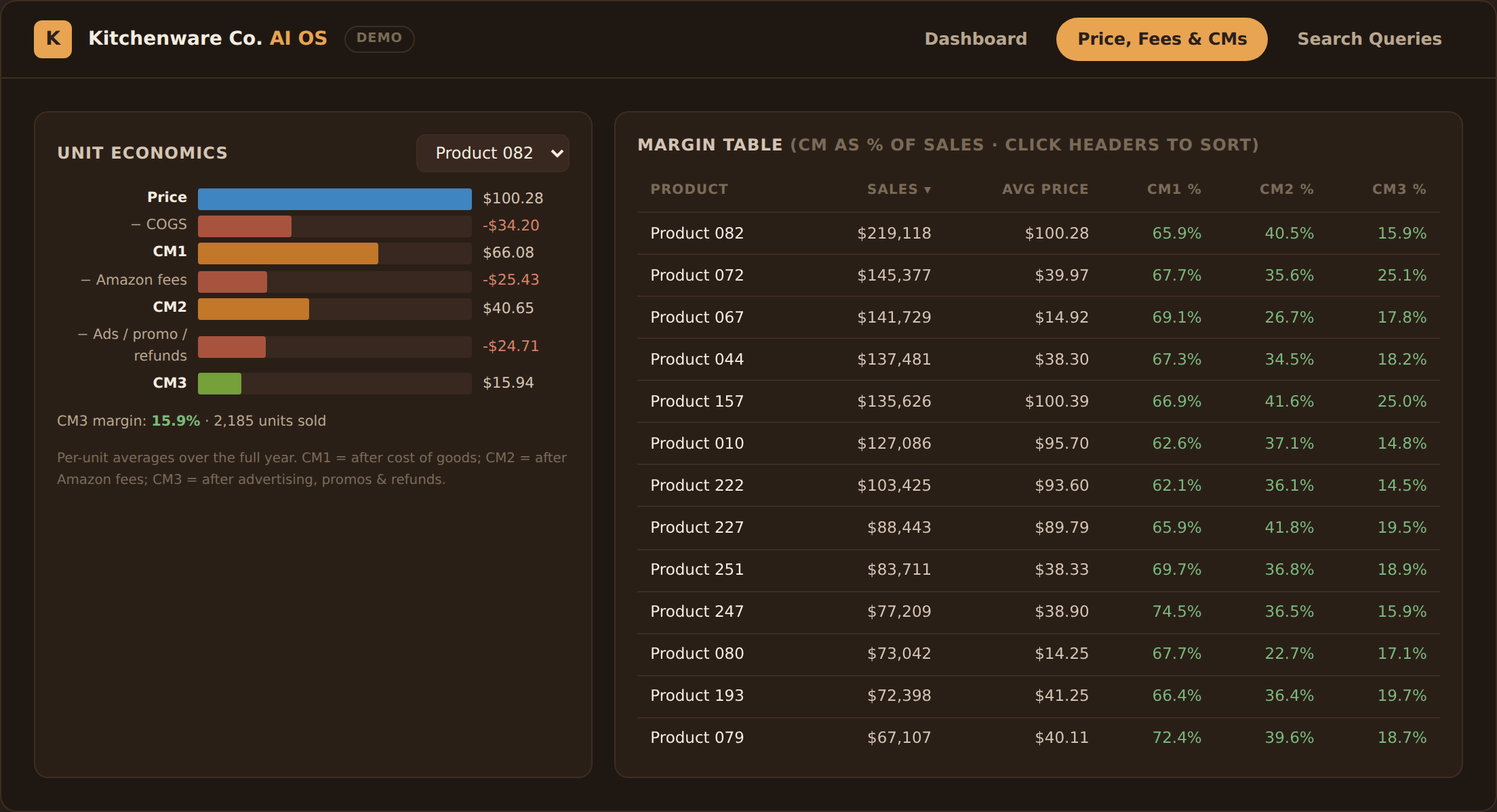
Per-unit price, fees, and contribution margin view
Unit economics per product: price → COGS → CM1 → Amazon fees → CM2 → ads & refunds → CM3, beside a sortable margin table.
Search query performance with brand-vs-market funnel
Brand Analytics search queries with the brand-vs-market funnel — the gap between the bars is the growth opportunity.

Try the workspace yourself

Interactive replica on anonymized sample data — filters, drill-downs, and the AI analyst all work in your browser.

Launch Interactive Demo →
Fulfillment Automation Shopify App Amazon MCF

Travel Brand — Shopify→Amazon Fulfillment Bridge

The same travel brand from Case Study 2 came back with a new problem: fulfill Shopify orders from Amazon FBA inventory without living inside Seller Central. I built them an embedded Shopify app that does it with guardrails.

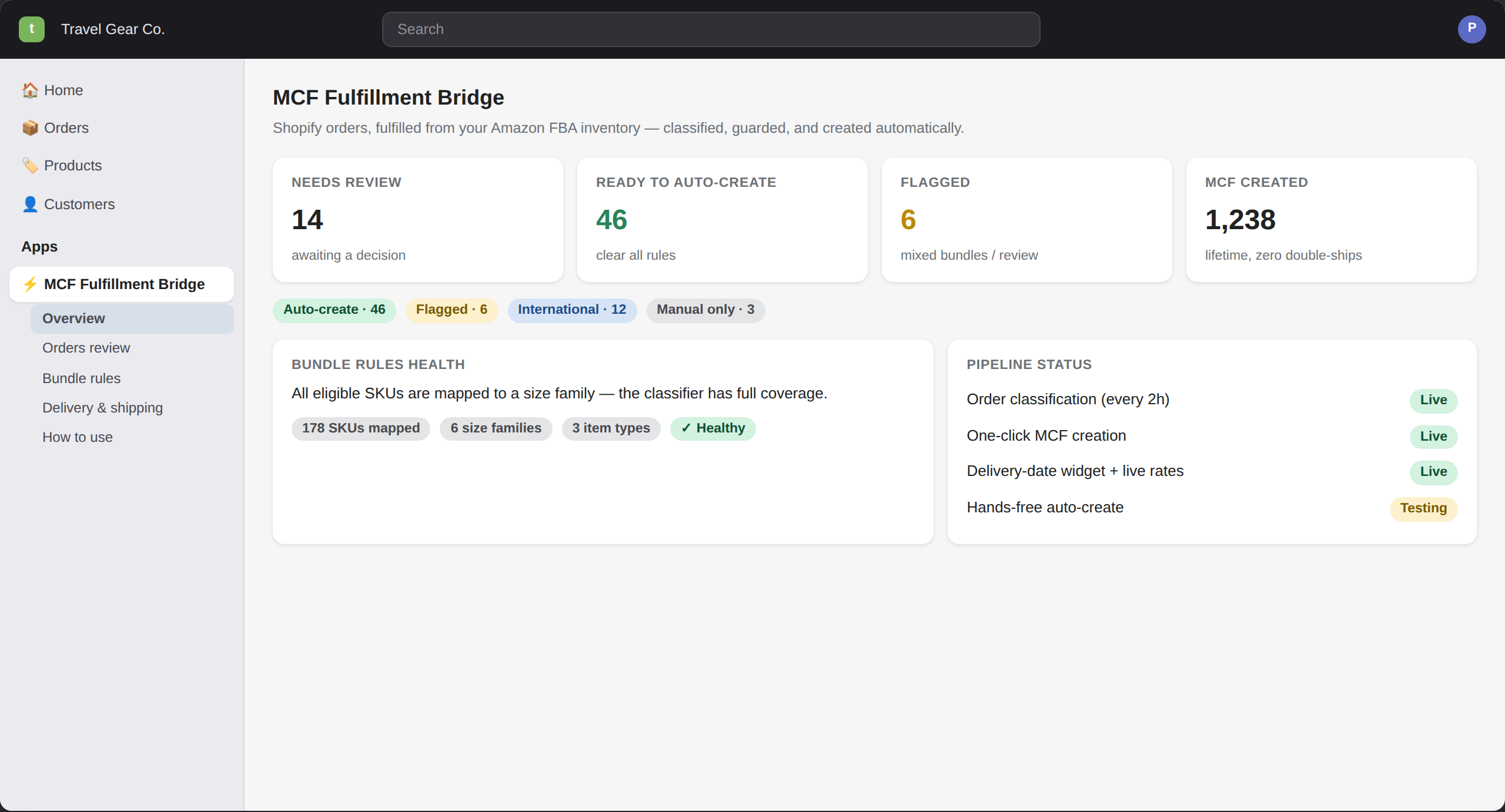
MCF Fulfillment Bridge — app home with classification KPIs
The app home inside Shopify admin — every open order classified, bundle-rule coverage, and pipeline status at a glance. (Interface re-imagined with sample data — the real app runs in the client’s store.)

The Challenge

Every Shopify order meant a manual trip into Amazon Seller Central to create a Multi-Channel Fulfillment order — after eyeballing whether the items could even ship together (their products ship in size-specific packaging, so wrong combinations get rejected or double-charged). Checkout showed static shipping estimates that had nothing to do with real fulfillment speed. Order volume was growing; the ops workload grew with it, one order at a time.

What I Built

  • An embedded Shopify admin app (Remix + Polaris) the ops team uses without leaving Shopify
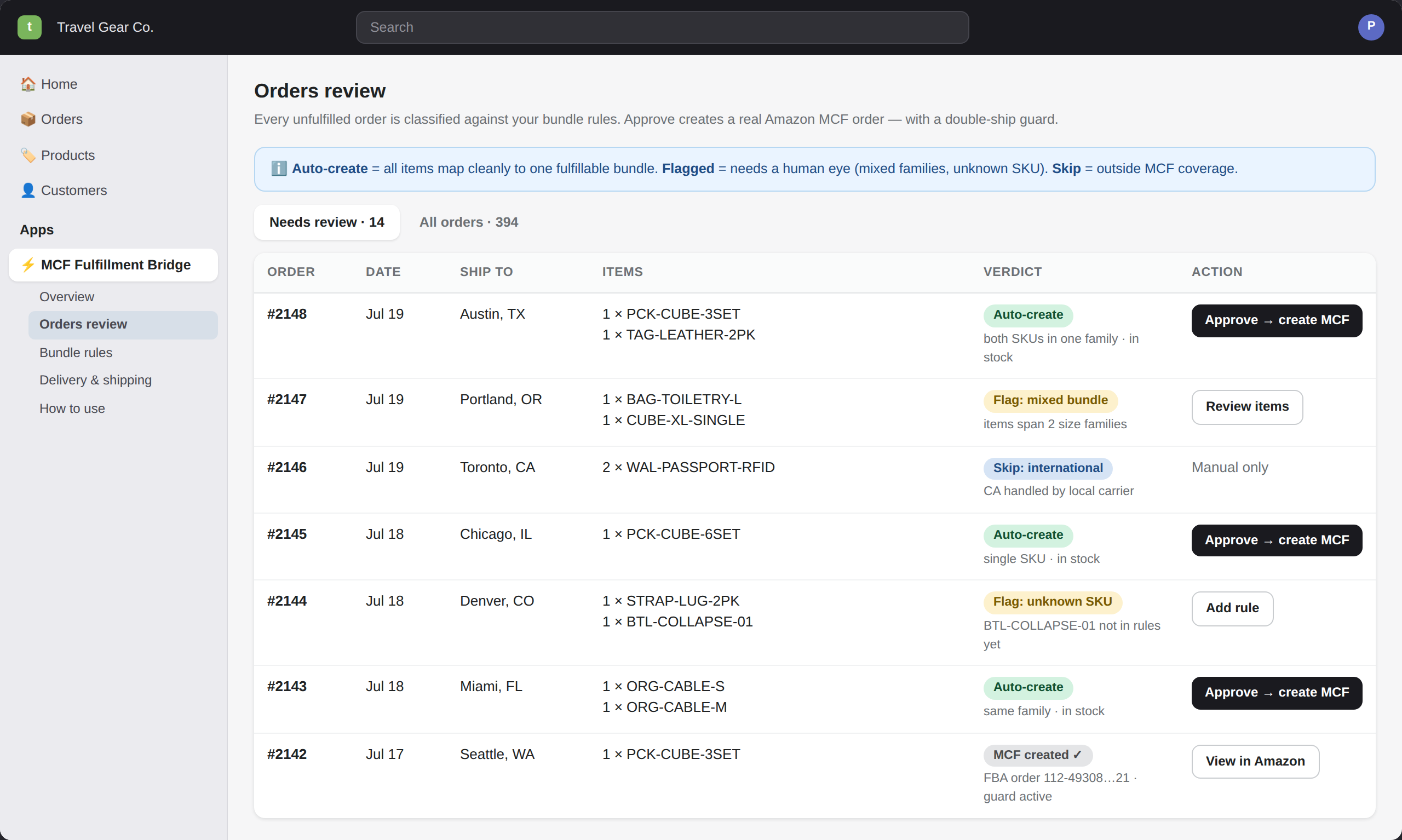
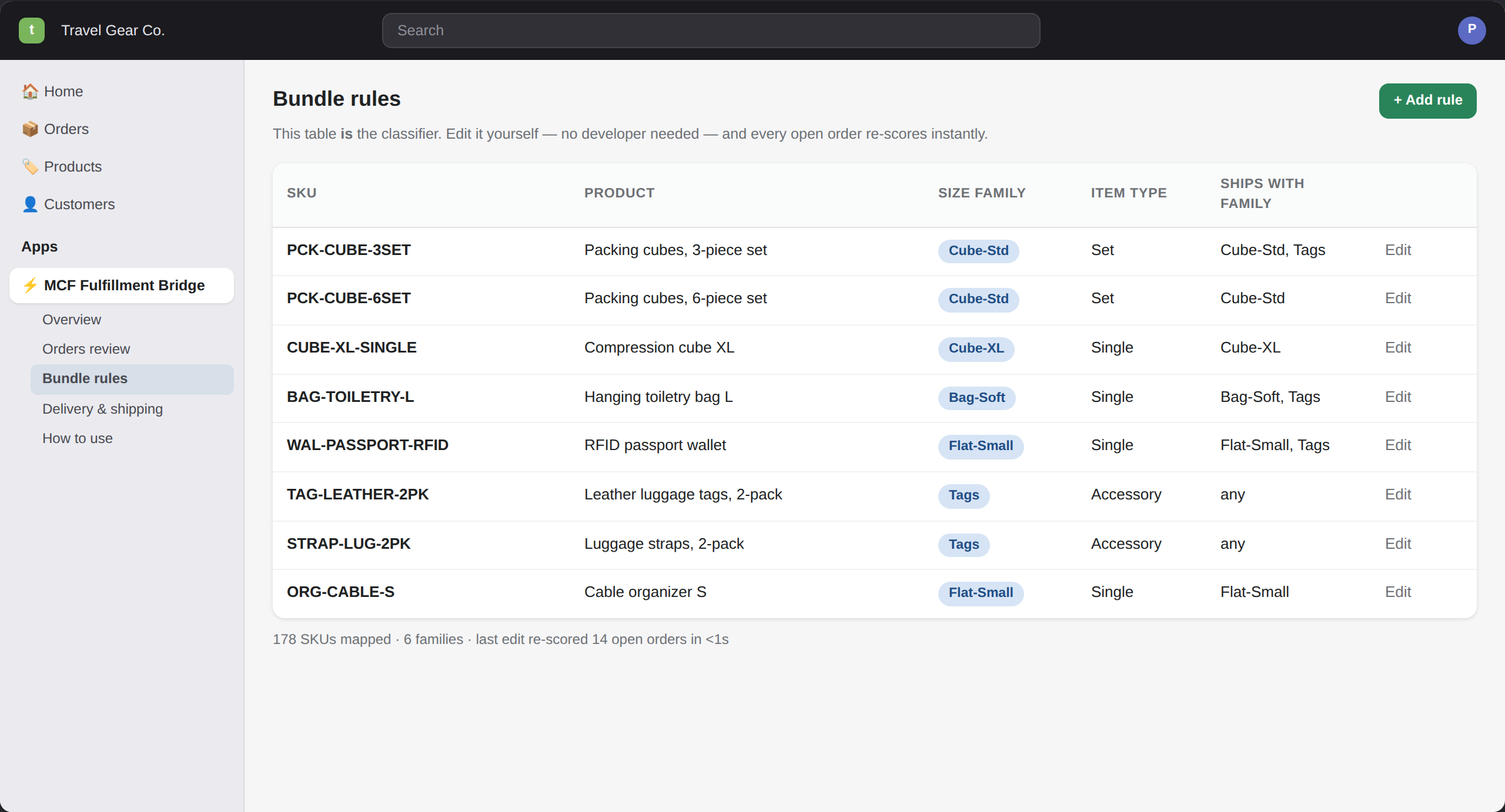
  • Auto-classification: every unfulfilled order scored against a merchant-editable bundle-rules table — auto-create / flag / skip, with the reason shown on the order
  • One-click "Approve → create MCF": a real Amazon fulfillment order via SP-API, with a double-ship guard, eligibility re-check at click time, and a full audit log
  • Live Amazon delivery quotes powering a storefront delivery-date widget and real-time checkout shipping rates (Carrier Service API) — customers see actual arrival dates, not guesses
  • Self-maintaining plumbing: 2-hourly classification from the BigQuery order feed, token self-refresh, and no customer PII persisted in the app's database

The Impact

  • Per-order Seller Central work replaced by one click — or no clicks: ~60% of classified orders qualify for zero-touch auto-creation
  • Packaging-mismatch mistakes caught before fulfillment — the rules table the merchant edits themselves is the classifier, so coverage grows without a developer
  • Checkout went from static estimates to live carrier-backed delivery dates — fewer "where's my order?" tickets and honest expectations at purchase time
Shopify Admin API Polaris Remix Amazon SP-API Carrier Service API Supabase BigQuery

Inside the App (re-imagined interface — sample data, real workflow)

Orders review — verdict badges and one-click MCF creation
Orders review: every order carries a verdict and its reason — approve buttons only appear where fulfillment is actually safe.
Bundle rules — the merchant-editable classifier
The bundle-rules table IS the classifier — the merchant edits it and every open order re-scores instantly.
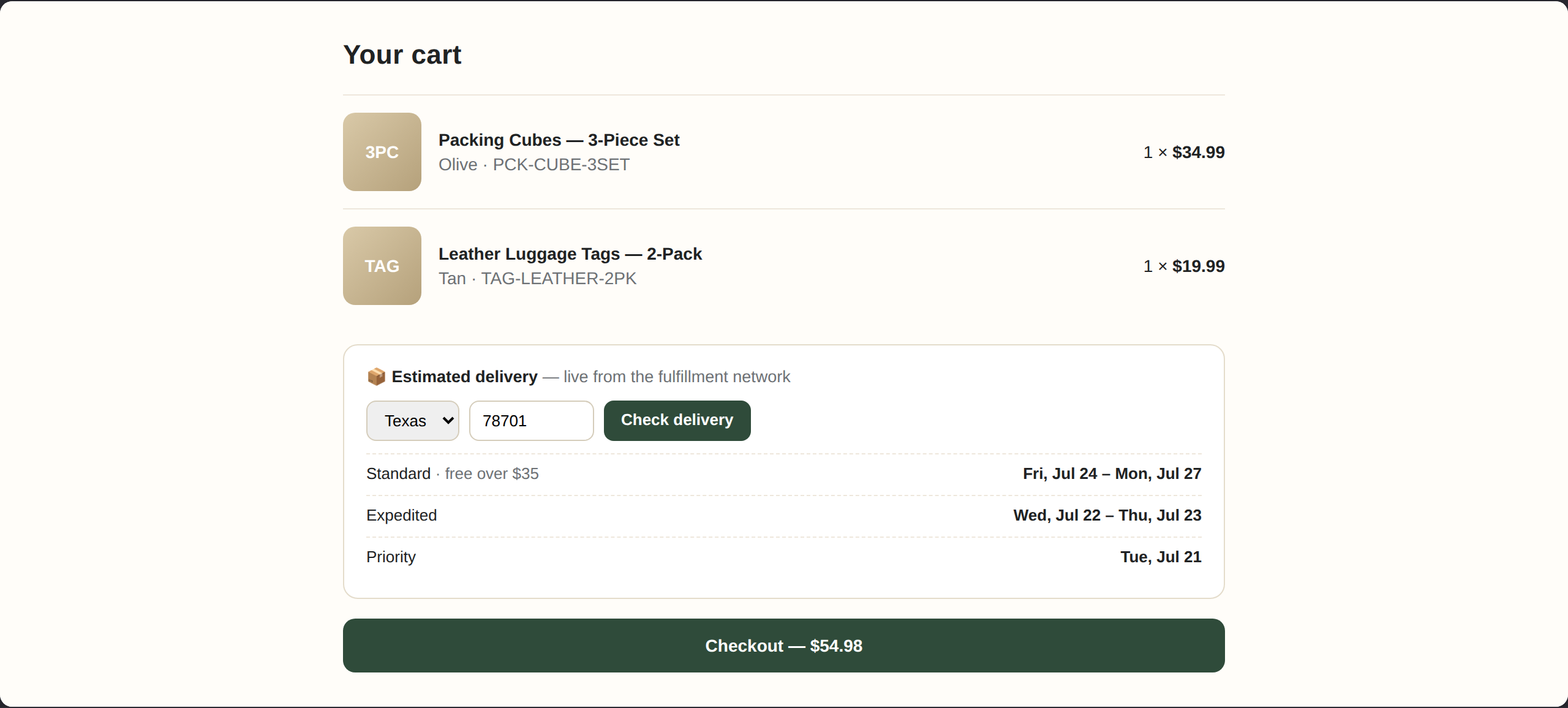
Storefront cart with live delivery-date widget
The storefront side: live delivery dates in the cart, quoted from the fulfillment network at that moment — the same quotes price shipping at checkout.

Have a Similar Challenge?

I help e-commerce brands build the data infrastructure they need to make faster, better decisions.

Let's Talk